Friday, June 25, 2010

How to make passive income on the internet: Part 1

Passive income, it’s what we all want. But how do you make it happen? Well, here is a quick-start guide for you. These are some ideas that can help you create passive income (well, not completely passive) by owning a content based website. First, let’s talk about blog sites. If you didn’t already know, blog websites are simple to open and they allow people to express their opinions, talk about their expertise, provide reviews, etc. Anyone can get one of these up and running in just a few hours. First, decide on a topic or a variety of topics you want to write about. For example, you might want to talk about “parenting skills” or maybe you are a wine connoisseur. Let us pretend we are going to blog about wines. Visit Blogspot.com and create an account (it is free), or create a blog site from scratch if you already know how. For example, our account on Blogspot.com is http://tekprosus.blogspot.com/. We also have a blog on our webpage at www.tekpros.us/blog. Let us pretend we created an account called “SimpleWineReviews.Blogspot.com”. Now you have to fill your blog with content. You can start off slowly and grow over time or you can immediately add various articles. The idea is to keep your readers interested in the articles you write about and have them want to visit your blog again. Loyalty is key! You could write up a quick review about a different wine every day. You could also write about different wineries. Be creative.

Another important factor to remember is consistency. Consistency can make you or break you. Be sure to add something new EVERY DAY! Why? Because this will help with your search ratings. Let me explain: When someone wants to find information about wines, they will probably use a search engine like Google, Yahoo, or Bing. These search engines are constantly checking websites for changes and for keywords. Every time you add a new article to your blog, the search engines make a note of it and the likelihood of your blog being found increases. You want to be one of the first sites that come up when someone types “wine reviews” into Google. Again, the only way to do this is by being consistent!

Now we need to help get the word out about your blog. You need to become familiar (if you aren’t already) with different social networking tools such as FaceBook, Twitter, Digg, Delicious, LinkedIn, SumbleUpon, MySpace, and many more! Create accounts at these sites and read about ways to link them together and to your blog. For example, our FaceBook account, fan page, and Twitter accounts all update at the same time and have links back to our blogs. The different search engines will begin to see “SimpleWineReviews.Blogspot.com” popping up everywhere.

Another good practice is to link your blog’s site with other blogger sites. The more links to your blog, the better! Recruit your friends and family to help get the word out about your blog. They can also post links to your blog on their social networking pages (like FaceBook, Twitter, etc.).

GREAT! I created my blog, I opened various social networking accounts, and everyone I know is helping me promote it – but how does this make me money??? Click on the link below to continue reading part 2 of this article.

Continuation of How to make passive income on the internet: Part 1

Ah, the big question we all have! The answer is simple: through advertisements. Now the question becomes “How do I get companies to advertise on my blog page?” Well, it is not as hard as you might think. In fact, Google offers a free advertisement service called AdSense. You can incorporate AdSense on your blog through a simple copy-and-paste code that Google will provide to you. To learn more about how it works, visit this YouTube video: http://www.youtube.com/watch?v=qEk1PHEXemQ. It is a very good overall explanation of this powerful tool. Once you feel you are generating enough traffic to your site, you can start selling advertisement space on your site to other companies (not just Google).

For more information on how to use these tools or if you have other techie questions, feel free to contact Tek Pros by visiting our website at www.tekpros.us. Also, be sure to add me as a friend on FaceBook to ask me questions directly or for regular technology updates. Find me at www.facebook.com/stiehm.

Written by Casey Stiehm with Tek Pros

About the author:
Casey Stiehm is an IT professional and business consultant. He is the Vice President of Tek Pros as well as an IT instructor with Insyte Technical Training. His technical certifications include: A+, Network+, Security+, MCP, MCSA, MCSE, MCITP, and others. He has taught and continues to teach these certification courses to individuals, government agencies, military personnel, non-profit organizations, and businesses around the world. For more information about his services, please visit www.tekpros.us or www.insytetraining.com.

Wednesday, June 23, 2010

So you want a personalized phone number… and you want it to be FREE! Well, lucky for you Google is giving these numbers out right now! Let me tell you a little bit about how their service works. First, you need to visit www.google.com/voice. Once you get there, you can create a Google Voice account. Now here is the really cool part: you can search for available phone numbers by zip code, area code, and even words. So how did I do it? I entered in my area code (571) and then I entered in my name (Casey). One of the numbers that came up in the search results was 571-40-Casey, which I selected. Next, it asked me to enter any numbers that I wanted to link to my new Google Voice number. How cool is that? Now all my friends, family, and co-workers can call one number and it can ring all of my phones at once! Also, you can listen to voicemails as people are leaving them, and even take the call in the middle of the voicemail. Confused? Let me explain. Your mom calls. You love your mom, but she talks a lot. The game is starting in two minutes. So, with Google Voice, you let the call go to voicemail. Your mom starts to leave you a voicemail. But what she doesn’t know is that you are listening in on the voicemail that she is leaving for you. And if you decide to talk to her while she is leaving you a voicemail, you can hit the * button on your phone and begin speaking with her immediately. Pretty cool, huh? There are tons of great features available with Google Voice. One of the best features is a widget that you can put on your website which allows someone to call you directly from your site. When they click on the button, Google calls them and then connects them to your number – and it even keeps your phone number private! So get a Google Voice account today and start having fun! If you want to test it out – just click on the “Call me” widget below – enter your name and your phone number and it will connect you to my phone!

Written by Casey Stiehm with Tek Pros

The Battle of the Tablets… or Not?


It was just a matter of time before Toshiba would produce a tablet PC – or is it a notebook? If you haven’t seen it before, the Toshiba Libretto has dual screens! Users have the capability to watch a video on one screen and browse the internet on the other. It not only runs multiple applications, but you can use both screens to read e-books. Each screen has a resolution of 1025×600 which is great for watching movies on those long flights or metro rides. With its dimensions being 4.84 inches wide and 7.95 inches long, it’s easy to carry and does not take up much space. The only downside to this unique gadget is the price. The Libretto is around $1,100 bucks! So if you have the funds, go for it! If you have a tight budget… a simple NetBook might be the way to go. Get more information on the Libretto by visiting http://laptops.toshiba.com/laptops/libretto.

Monday, June 21, 2010

AWESOME camera for the summer!

It’s officially summer! Now it’s time for you to live up to all those promises you made. You’ve decided how you were going to spend that two week vacation, but how do you want to remember this trip after spending all winter planning for it? With digital cameras being one of the best ways to capture those memorial moments, The Sony Cyber Shot TX7 is the way to go. It has a cool 3.5” inch touch screen that allows you to lock and capture targets, with the touch of a finger and an awesome panoramic mode that rotates 258 degrees to capture that beautiful scenery in one motion. With its capability to record movies in Full HD 1080i AVCHD and a USB connector, you can share video and images on your TV or computer. This camera will definitely make those who weren’t able to make the trip really feel like they were there. You can find out more about the features of the Sony Cyber Shot TX7 by visiting www.Sonystyle.com.

Friday, June 18, 2010

Build Your Own Tablet with the help of Liquidware

Yes! That’s right! You heard me correctly! You can build your own tablet! This is great for my developer friends out there who want to create and customize applications of their own. With the help of Liquidware, an open source hardware company, and $400 bucks you can purchase a tablet starter kit.

This start kit consist of a 4.3-inch OLED touch screen that mounts directly on a Beagle Board with a 1GHz processor, a battery module, and a 4GB pre-formatted SD card for booting Angstrom Linux. Users also have the capability of running the Android OS. The only type of memory storage for the Beagle Board is the SD card, but I will mention there?s an alternative to increasing memory by connecting an external hard drive to its on-board USB port. You will also find that it’s very light, no more than 8ounces. Also, tts battery life can last up to 6hrs. For more information about building your own tablet visit them at www.liquidware.com

Thursday, June 17, 2010

Just in: Mac and PC users coming together

We all know there is a war going on between Mac and PC users. Who is better, Mac or PC? Well if you’re like me, then you are tired of seeing a commercial of one bashing the other every two minutes. If only there was a way to bring these two giants together! It would make our lives easier, especially those of us who go back and forth between Macs and PCs. maComfort was created to help bridge the gap between the Mac and the PC. This amazing application provides PC functionality on the Mac such as previewing files, hotkeys, and even has skinning options.. The maComfort is an application that runs in the background and can automatically starts when your PC boots. Unlike Parallels, which is a virtual machine, maComfort does not require you to install a separate operating system. How well does it work? Well, we haven’t tested it out. However, there is a lot of talk about it through the grapevine. You can get it at www.rafaelklaus.com.

Wednesday, June 16, 2010

YouTube Makes Editing Uploaded Videos a Little Easier

For all you YouTubers out there constantly making changes to uploaded video clips, we are proud to announce that YouTube has launched a new video-editing tool. This tool allows users to edit already uploaded videos inside their web browser. This tool won't turn your videos into Oscar award winning productions, but it simplifies the editing process quite a bit. It's simple and easy-to-use interface features "drag and drop" functionality, music additions, and video trimming. So before you go out and spend your hard earned dollars on video-editing software, you might want
to give this a try.

Now you can edit those videos of your friends singing karaoke or that time
your college roommate shaved your pet gerbil!


by Shawn Pitt with Tekpros

Access your files ANYWHERE with Dropbox

Here is a cool app everyone should know about called Dropbox. Dropbox allows you to access your files from just about anywhere. Best of all – It’s free! Here is how it works: First, go to www.Dropbox.com and download the app onto to your computer(s) and mobile device(s). You create a Dropbox folder on your computer(s) or mobile device(s). All of the items that you place in your Dropbox folder will then synchronize with all your other computers or devices that have Dropbox folders. Another cool feature that Dropbox offers is the ability to access your files on the Dropbox.com website. You can even give other people access to all or some of your Dropbox files. This app is sure to take off!


by Shawn Pitt with Tekpros

Monday, June 14, 2010


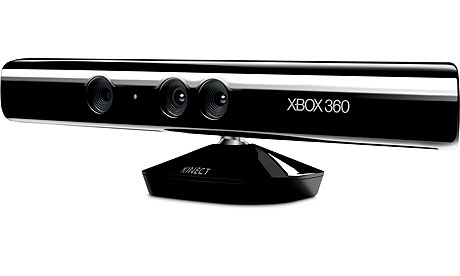
For all of you gamers out there, Microsoft unveiled its new motion detecting gaming technology on June 13th at the E3 expo. Kinect (formerly known as Natal) is a device for the Xbox 360 that captures a player’s body movements which are then recognized in the game they are playing. This motion sensing technology will give Nintendo a run for their money as it eliminates the need for a hand held controller. Microsoft unveiled Kinect with some major bling including a performance by Cirque du Soleil.

Sony also unveiled its new controllers which are similar to Nintendo’s but with a camera and better precision. Looks like Nintendo just got served! (Don’t worry Nintendo, some of us still root for the underdog.)

By Casey Stiehm at Tek Pros

Friday, June 11, 2010

Get thousands of friends on FaceBook!

So you want more friends on FaceBook huh? Well, it’s not as hard as you might think. First, let’s go over a couple of rules:

  1. Don’t start to add everybody you find on FB. This will result in FB blocking your account and not allowing you to add ANYONE! The key is getting people to add YOU.
  2. Also, don’t start going through your friend’s list of friends. This tends to make your friends unhappy and can result in those friends de-friending you.

So, how do you do it? By planning. Plan an event: A birthday party for your friend, a work event, an alumni event, a sports outing… just about anything.

Here is how it works: You plan the event and create an event page on FB. Then you add the some people that you already know. For example, if your friend is having a baby, host a baby shower for them. Create a FB page for her baby shower and invite her and some of her friends. Tell those friends to spread the word and other people will join the FB page. In the details section of your FB page, be sure to tell everyone to add you as a friend so that you can keep them informed of any changes or updates. You can also add the people that join the page, but forget to “friend” you.

Do five or so of these events and watch your friends list skyrocket!

Another very easy way to grow your friends list is to join various other fan pages or event pages. Regularly (like once a day or week) post a question regarding the fan page or event page. For example, you can join a technology related page. Post questions related to technology. “Hey, anyone ever hear of the Bloom Box? Does anyone know how I can get one and how much power it puts out?” Other people that know about it will respond. Thank them and add them as a friend or ask them to add you.

The more fan pages you join and participate in, the more friends you will get.

I have opened two other FB accounts for marketing and networking and ended up reaching the 5,000 friend limit both times. Lucky for us, FB has since removed the limit.

Oh and… you can find me on FaceBook under Casey Stiehm and the fan page is http://www.facebook.com/TekPros. Feel free to add me and the rest of the Tek Pros staff and/or join the fan page for technology news and updates. :)

By Casey Stiehm with Tek Pros


visit us at www.tekpros.us

So you want more friends on FaceBook huh? Well, it’s not as hard as you might think. First, let’s go over a couple of rules:

1. Don’t start to add everybody you find on FB. This will result in FB blocking your account and not allowing you to add ANYONE! The key is getting people to add YOU.

2. Also, don’t start going through your friend’s list of friends. This tends to make your friends unhappy and can result in those friends de-friending you.

So, how do you do it? By planning. Plan an event: A birthday party for your friend, a work event, an alumni event, a sports outing… just about anything.

Here is how it works: You plan the event and create an event page on FB. Then you add the some people that you already know. For example, if your friend is having a baby, host a baby shower for them. Create a FB page for her baby shower and invite her and some of her friends. Tell those friends to spread the word and other people will join the FB page. In the details section of your FB page, be sure to tell everyone to add you as a friend so that you can keep them informed of any changes or updates. You can also add the people that join the page, but forget to “friend” you.

Do five or so of these events and watch your friends list skyrocket!

Another very easy way to grow your friends list is to join various other fan pages or event pages. Regularly (like once a day or week) post a question regarding the fan page or event page. For example, you can join a technology related page. Post questions related to technology. “Hey, anyone ever hear of the Bloom Box? Does anyone know how I can get one and how much power it puts out?” Other people that know about it will respond. Thank them and add them as a friend or ask them to add you.

The more fan pages you join and participate in, the more friends you will get.

I have opened two other FB accounts for marketing and networking and ended up reaching the 5,000 friend limit both times. Lucky for us, FB has since removed the limit.

Oh and… you can find me on FaceBook under Casey Stiehm and the fan page is http://www.facebook.com/TekPros. Feel free to add me and the rest of the Tek Pros staff and/or join the fan page for technology news and updates. J

By Casey Stiehm with Tek Pro

World Cup 2010 Best App To Use

ESPN ScoreCenter App

It is World Cup time! No doubt there are fans all over the world that want/need to keep up with their country’s progress during this month long final of international soccer. Well there are TWO apps for that! There is ESPN 2010 FIFA World Cup app, as well as ESPN ScoreCenter app.

Do you like games…well who doesn’t! In a nutshell, ESPN ScoreCenter app offers very comprehensive sports coverage available right to your iPhone, iPod, or iPad. ScoreCenter has a lot of the same information that can be found on ESPN’s website, except for it’s in the palm of your hand in an easy to read and navigate format, at the touch of your fingertips.

You can add any of the major sporting leagues and tournaments to your mySports list, as well as follow all your favorite teams with the myTeams section.

Before the Game

Set game alerts for each of your favorite teams – when the game starts, when teams score, when a period/quarter ends, etc.

Read up on game previews, and analysis of how your teams are doing and who they are about to play. This app also lets you know what time and what channel the game will be played on.

During the Game

Get live play by play feeds and details on how your teams are performing.

Access in game stats and standings.

After the Game

Watch video highlights, and replay your favorite plays and scoring moments.

Get pumped up for the next game you plan to watch.

This app works for all the major sports you like to enjoy, from the NFL to rugby, from MLB to cricket, soccer, tennis, hockey, and even NASCAR! And if you are into the World Cup there is a separate free app for that!

The app is free (app for iPad is a couple bucks), and well worth a look if you are into sports. If you aren’t into sports, well then at least you can be useful to your friends who might not have an iPhone.


visit us at www.tekpros.us

Your iPhone and BlackBerry keeping you healthy!


Remember when the ball dropped and you said that in 2010 “I will watch what I eat and get into better shape?” Well, it’s almost summer and that whole “trying to keep track of what you eat” idea got lost under your stack of work papers. Didn’t quite make it happen huh? Well LIVESTRONG.com has come up with an app for those busy individuals who can’t always keep track of their eating habits. Their digital calorie tracker can be installed on your BlackBerry or iPhone, so you can take it with you EVERYWHERE! This application has a database of over 525,000 items found in restaurants and grocery stores. Not only does it keep track of what you’ve had today, but also the previous meals you might have eaten earlier in the week. It will even calculate how many calories you’ve burned after a long work out at the gym! With bar graphs and cool nutrition facts, LIVESTRONG.com can help transform your flabby midsection into beach-ready abs!


By Shawn Pitt with Tekpros

visit us at www.tekpros.us

Technology finds your doctor

Tired of your doctor running late? And the receptionist has no clue of when they’ll be in?

Well we’ve found the solution to those long stays in the waiting room. With the medwaittime.com app you can find out how long it will take your doctor to get in. Now you’ll be able to get that extra hour of sleep, or even catch the whole episode of your favorite daytime show. The application was launched by Vishal Mehta, an orthopedic surgeon who routinely ran late causing his patients to sit in the waiting room for up to an hour or more. If you are one of those “on-the-run” kind, you can sign up to receive text-message alerts as well.

Find them online at www.medtimewait.com


by Shawn Pitt with Tekpros

visit us at www.tekpros.us


The New iPhone 4 – Quick and Simple!

Keeping it simple – new features:

Front and rear camera (rear has an LED flash) upgraded to 5 megapixels and a 5x zoom

Same A4 processor as the iPad

Thinner with a high resolution display of 960×640

HD video recording capabilities

Has video conferencing available between other iPhone 4 devices

Longer talk times up to 7 hours

Price tag: $199 for 16GB and $299 for 32 GB


visit us at www.tekpros.us

Inside your mouse… the technology is amazing!

Ah...

This is one cool app!

The world has been blown away by the phenomena known as “The iPhone” and now with the new iPad, there are many new apps coming out every day that work on both devices. One such app is Square. First, let me say: IT’S FREE! This is sometimes the most important aspect of an app. Second, it can help put some dollars and cents into your pockets – from ANYWHERE. Interested yet? Moving along…

Square allows you to take cash and credit card payments directly from your iPad. It also allows you to email a receipt to the “buyer”. With the ability to add tax, color code, and create an inventory of your products, this simple app makes sales a mobile activity. Now you can sell those homemade doohickeys at the flea market, your report writing skills to Bob at the office, or those used SP3 games to your friends. Once you sign up for the service, they will ship you out a free credit card reader that connects directly to your device.

Some users have been unhappy with the limitations that the app places on transactions, as well as the lack of more advanced features such as the ability to use company EIN numbers. As for me, I give it five stars based on two major features: free and simple.

For more information about this app, visit their website at http://squareup.com.

Be sure to read their privacy statement. Their information collecting practices might not be acceptable to everyone.


Article by Casey Stiehm


visit us at www.tekpros.us


Cell Phone as a Loyalty Card

This is a good article to read about how cell phones (like the iPhone) are being used as digital loyalty cards. Hey, you could even get free coffee from Starbucks!
http://www.nytimes.com/2010/06/01/technology/01loopt.html?ref=technology


visit us at www.tekpros.us

Jailbreaking the iPad

Jailbreaking the iPad: What You Need to Know

Jailbreak Your iPad!The iPad has recently been jailbroken. Even if you’ve held off jailbreaking your other iPhone OS devices, the iPad’s substantially faster hardware and difficult-to-define “3rd device” role make the best case yet for jailbreaking. A user- and developer-updated compatibility list will help you see what’s safe to install on your iPad, and I’ll list my favorite apps and extensions for your freshly jailbroken device.

Apple’s App Store has become notorious for its restrictive and often arbitrary decisions about what does and doesn’t make it into the store. We’ve seen many pieces of quality software get denied or kicked out of the App Store, sometimes for unclear or unknown reasons.

Many of these, however, have subsequently made their way into Cydia, the jailbroken app installer (note that the App Store works just fine on jailbroken devices, too). GV Mobile, a great interface for Google Voice, Dashboard, a clone of Mac OS X’s Dashboard for iPad, and Wifi Sync, a paid application for performing iTunes syncs over Wi-Fi, are just a few examples. And there are plenty more programs and extensions that are available in Cydia that have never even been submitted to the App Store.

Besides these examples of nixed software, the world of jailbreaking also offers a multitude of tweaks that aren’t available to the user on a normal iDevice, like changing system sounds or interface elements. While a much higher proportion of the software available through Cydia is free compared to what you’ll find on the App Store, it does also contain paid software.

The iPad: What’s Changed?

The single-button installation screen for the Spirit jailbreak for iPad.

Many people express concern about jailbreaking their iPhones because they don’t want to sacrifice stability or speed on their phones. While the vast majority of jailbreak software is perfectly stable, it’s true that this software doesn’t go through the same level of grueling testing to which Apple subjects software that makes it into the App Store. And software that lets you run 3rd-party programs in the background, otherwise change the interface, and so forth, can have effects on your device’s performance, so I can understand why some people are reticent about this.

However, the iPad’s processor and memory are substantially more powerful than that of the current iPhones and iPod Touches. Its hardware makes it much better suited to effective multitasking, and its role in most peoples’ workflow makes a good for jailbreaking, both because jailbreaking makes it more useful, and because it simply won’t be used the same way as your phone.

If jailbreaking means accepting a slightly lower standard of stability (which is debatable to begin with), it just isn’t as crucial as on your phone. After all, the iPad is a device begging to be treated more like a computer than a phone, and jailbreaking makes that much more possible than Apple’s approved software possibly can.

I for one am willing to sacrifice a little polish for functionality on the iPad.

It is worth noting, however, that multitasking will come to the iPad with Apple’s blessing, albeit in a limited form, with this fall’s release of iPhone OS 4.

Now, because of the nature of the software available through Cydia, it’s important to remember that not everything originally written for iPhone/iPod Touch works with the iPad.

Be sure to consult the Google Docs spreadsheet created by iPhone Dev Team member MuscleNerd, before you install anything through Cydia. If you stick to this list, you should be safe. And if you like to live dangerously, remember that you can always restore and be right back where you started if need be (and don’t forget to make a note in the Google Doc about what happened!). We’ve set up a page on our Wiki to keep track of compatible apps, too.


visit us at www.tekpros.us

Jailbreak Favorites

My favorite jailbreak programs right now (on both iPhone and iPad) are Notifier, a little extension that puts icons in your status bar for new email, messages, etc, SBSettings, a little panel of useful controls that slides down from the status bar, even within other apps, and Backgrounder (source code), so you can listen to Pandora while you draft an email (for instance).

Another one of particular interest to iPad users is called FullForce, and is a convenient, packaged implementation of an elaborate .plist hack (via Gizmodo) that lets iPhone apps format themselves for the iPad’s screen without pixel doubling. It isn’t perfect, but works spectacularly for many apps, including Facebook and the New York Times.

These programs don’t all have sites of their own, but you can find them in Cydia on your jailbroken iDevice, along with description and screenshots.

For those of you planning to jailbreak, once you do, don’t forget to back up your SHSH ‘blobs,’ the hashes iTunes checks when you restore, so you can restore to this jailbreakable version of the OS even after Apple updates it, closes the jailbreak vulnerability, and stops signing restores of OS 3.2. This way, if you ever need/want to restore to an earlier version of the OS, it’s straightforward to trick iTunes with the backed up ‘blobs.’ Saurik, famed in the jailbreak community for creating Cydia, has a good explanation along with detailed instructions on doing this on his site.

Once you’re jailbroken, it’s easiest just to back them up through Cydia. Alternatively, this method, using a program called Firmware Umbrella, works whether or not you are jailbroken, and is a good idea if you haven’t yet but think you might want to in the future.

Finally, do keep in mind that jailbreaking voids your warranty as far as Apple is concerned, so always restore to an un-jailbroken state before taking your device to Apple for service.

Source: PCWorld.com


visit us at www.tekpros.us

iSCSI: What is it?

Internet Small Computer System Interface, commonly known as iSCSI, is an IP based storage network. iSCSI is utilized for data migration from previous and old technology such as intranets and aids to regulate and keep control on storage necessities from vast distances. iSCSI is effectively used for data transfer over LANs- Local Area Network, WANs-Wide Area Networks, or over the internet. It helps in transport of data and also access of data regardless of its location. The computer administrator can easily transmit SCSI instruction to SCSI targets with efficient IP protocol, on servers that are at distant. It is a famous SAN protocol, Storage Area Network, that permits numerous firms to blend many storage units to key data storage. Moreover, the host servers are benefited from huge storage space. It is in contrast to normal Fibre Channel, where especially designed cabling is recommended. You don’t have to change the present network as iSCSI workd efficiently over present storage systems too. iSCSI is bi-directional and this lets the protocol to turn back data in case that there is this kind of a demand. iSCSI is one of the two effective ways to transmit data over IP networks. Additional means to transmit data over IP is Fibre Channel. It is also called as FCIP. This process aids to transform Fibre Channel control codes as well as data in IP packets. These IP packets are transmitted through geographically far away Fibre Channel SANs. This approach is even called as Fibre Channel tunneling. But however, Fibre Channel approach can operate only on Fibre Channel technology. But iSCSI strategy over IP networks can perform on the present Ethernet networks of the structure. Many of the famous business firms such as IBM, Cisco and Nishan have recently launched iSCSI centered solutions. For example, switches and routers introduced by these companies are iSCSI-based. Generally, all the end users find less complicated to set up and manage iSCSI in contrast to Fibre Channel. Its also quite cost-effective to set up this technology. Software and hardware manufacturers transmit SCSI instructions over IP network. Since, the computer users send all the important operating systems, the overall expense is greatly reduced. While the hardware makers improve functionality significantly by iSCSI host bus-adapters. Also, the prices of Fibre Channel host bus adapters are quite higher and its price increases on its performance and the number of ports used . iSCSI SANs provide Ethernet advantages above Fibre Channel. Thus, iSCSI SAN is the best alternative to Fibre Channel in any IT based firm. Server virtualization has drastically stimulated the progression of iSCSI’s betterment. Any organisation setup has shown considerable improvement in its performance. Therefore, the buyers are now contented with this amazing storage solution which has aided the organization to achieve substantial revenues and its goals. You can always search for a reliable and reputed company online that offers excellent and effective business solutions for your IT based company. There are numerous businesses providing best business alternatives to help you gain your business plans effortlessly. With successful execution of iSCSI SAN in virtual environments, all the IT based firms have advanced its effectiveness and accumulated large profits.

Article Courtesy of – CopyandPasteArticles.com

About the Author

Know more about iscsi and iscsi target at starwindsoftware.com

visit us at www.tekpros.us

IT Certification Salaries

Check out this article by TechRepublic: http://www.globalknowledge.com/training/generic.asp?pageid=2293&country=United+States. This is a great article on salaries, based on IT certifications!


visit us at www.tekpros.us

CompTIA changes the rules

CompTIA is changing the rules on the techie certs. Click on this link to see the article on their new certification renewal policy: http://www.comptia.org/certifications/listed/renewal.aspx


visit us at www.tekpros.us

Check out our latest tutorial: How to make a network cable

Tek Pros has been busy working on short tutorials that everyone will find helpful. Click on this link to see the latest addition to our tutorial collection: How to make a network cable


visit us at www.tekpros.us

Microsoft readies Office 2010 upgrade program

It is not uncommon for Microsoft to launch a “technology guarantee” program ahead of a new version of Office or Windows, offering buyers of a product late in one cycle an upgrade to the new version once it comes out. So it’s not a shocker that Microsoft has one planned for Office 2010.

That said, Microsoft wasn’t quite ready to tell the world about the program. Nonetheless, an employee briefly posted details of the planned upgrade offer on a blog. It was quickly pulled down, but the cat is out of the bag. (The post also lives on in a Google-cached version, as noted by Ars Technica.)

According to the now-removed posting, the program will kick off March 5, meaning people who purchase Office 2007 between March 5 and September 30 can get a free upgrade to a comparable version of Office 2010. Users will be able to download Office 2010 as soon as it is made broadly available. Customers can also order a DVD, for a small fee.

Buyers get one copy of Office 2010 for each eligible copy of Office 2007 they buy, with a limit of 25 free upgrades per person.

Microsoft said any posting was done in error and the company has nothing to say about a tech guarantee program.

The company did confirm to CNET earlier this week that it has given some testers a near-final “release candidate” version of Office 2010, with the final version due to go on sale in June.

Meanwhile, SD Times has a post up on its Web site noting that Microsoft is considering some new subscription pricing options for business users of Office. Microsoft declined comment on that report.


visit us at www.tekpros.us